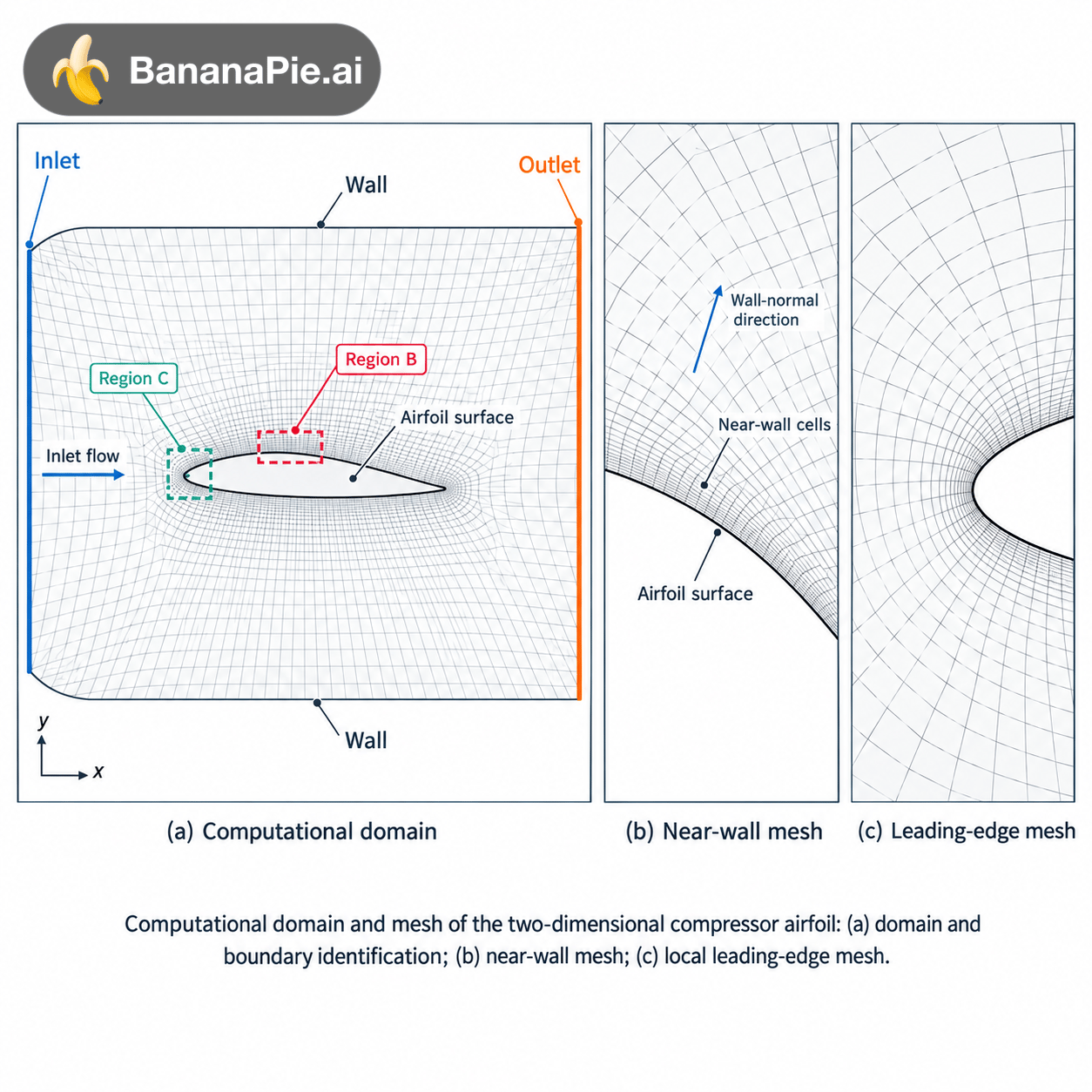
Create a publication-quality three-panel scientific figure illustrating the computational domain, boundary identification, and local mesh resolution for a two-dimensional compressor airfoil CFD model. The figure must describe the supplied computational model faithfully. Use the actual airfoil coordinates, mesh files, or mesh screenshots as geometric references whenever provided. Preserve their topology and connectivity rather than replacing them with an invented mesh. LAYOUT Use a clean landscape composition with three panels arranged from left to right: (a) Computational domain (b) Near-wall mesh (c) Local mesh detail Give panel (a) approximately 50% of the available width and panels (b) and (c) approximately 25% each. Align panel boundaries and place modest, consistently sized subfigure captions below the panels. Use a white background, restrained colours, crisp technical lines, and balanced whitespace. Do not place a large title above the figure. PANEL (a): COMPUTATIONAL DOMAIN Show the complete two-dimensional computational domain containing the compressor airfoil. Clearly identify: • Inlet • Outlet • Airfoil surface • Other boundaries actually present in the supplied model If the model uses periodic passage boundaries, label the corresponding pair “Periodic boundary” and visually indicate their correspondence. Do not introduce periodic boundaries unless they are part of the actual model. Show a small coordinate system with x and y axes and one unobtrusive inlet-flow direction arrow. Display the actual mesh sufficiently lightly that the airfoil and domain boundaries remain visually dominant. Preserve the supplied structured, unstructured, or hybrid topology. If verified domain dimensions are supplied, annotate them using the given values or chord-normalized distances. Otherwise omit dimension values. Mark two regions of interest: • Region B: a near-wall section of the airfoil • Region C: the leading-edge or trailing-edge region shown in panel (c) Use fine outlines and unobtrusive connectors to associate these regions with their enlarged views. PANEL (b): NEAR-WALL MESH Show a genuine enlarged view of Region B from the same mesh. Make the airfoil surface, first near-wall cells, and outward mesh spacing clearly visible. Show the progression from fine near-wall resolution to the surrounding mesh without exaggerating or altering the original spacing. Use only a few short labels where necessary: • Airfoil surface • Near-wall cells • Wall-normal direction If the actual mesh does not contain identifiable layered cells, preserve its true topology and use “Near-wall refinement” instead of inventing boundary-layer layers. Do not add numerical first-cell heights, layer counts, growth ratios, or y⁺ values unless they are supplied and verified. PANEL (c): LOCAL MESH DETAIL Show a genuine enlarged view of Region C, using either the leading edge or trailing edge according to the supplied data. For a leading-edge view: Show how the actual cells resolve the nose curvature and connect to the surrounding mesh. For a trailing-edge view: Show how the actual cells resolve the trailing-edge geometry and connect to the downstream region. Include wake refinement only if it exists in the supplied mesh. Do not sharpen, round, thicken, or otherwise modify the airfoil geometry to make the mesh look cleaner. Caption the panel accordingly: “(c) Leading-edge mesh” or “(c) Trailing-edge mesh” SCIENTIFIC CONSISTENCY All enlarged views must come from the same computational mesh shown in panel (a). Keep the same orientation throughout the figure. Do not mirror the airfoil or reverse the inlet and outlet between panels. Do not display crossed cell edges, disconnected cells, or invented improvements. If the source mesh contains a visible problem, retain it for review rather than silently correcting it. Do not add CFD contours, shock waves, streamlines, pressure distributions, or performance values. This figure explains the domain and mesh, not the computed flow solution. Do not include a mesh-independence curve unless actual mesh sizes and corresponding computed results are provided. Any such curve must be plotted separately from verified data. VISUAL STYLE Use: • Black or dark charcoal for the airfoil boundary • Thin neutral-grey lines for the mesh • Muted blue for inlet identification • Muted orange for outlet identification • A restrained teal accent for confirmed periodic boundaries • Dark-grey text and fine annotation leaders Mesh lines must remain distinguishable at final publication size without overwhelming the geometry. Use consistent line weights and avoid unnecessarily dense labels. Use Arial or another clean journal-compatible sans-serif font. Keep annotation text readable at approximately 8–10 pt at the final figure width of 180 mm. Subfigure captions should be only slightly larger. Avoid oversized headings, coloured background cards, gradients, shadows, three-dimensional effects, decorative icons, and watermarks. DATA AND OUTPUT REQUIREMENTS Do not invent the solver, turbulence model, operating conditions, grid size, or convergence criteria. These should be documented in a separate simulation-settings table. If actual mesh data or screenshots are unavailable, produce only a conceptual layout and visibly label it: “Conceptual schematic — not the computational mesh.” Prefer editable SVG or vector PDF output when genuinely supported. If only raster output is available, provide a high-resolution reference image without claiming it contains editable vector geometry. Suggested caption: “Computational domain and mesh of the two-dimensional compressor airfoil: (a) domain and boundary identification; (b) near-wall mesh; (c) local leading-edge or trailing-edge mesh.”

@Camille W
Prompt
Create a publication-quality three-panel scientific figure illustrating the computational domain, boundary identification, and local mesh resolution for a two-dimensional compressor airfoil CFD model. The figure must describe the supplied computational model faithfully. Use the actual airfoil coordinates, mesh files, or mesh screenshots as geometric references whenever provided. Preserve their topology and connectivity rather than replacing them with an invented mesh. LAYOUT Use a clean landscape composition with three panels arranged from left to right: (a) Computational domain (b) Near-wall mesh (c) Local mesh detail Give panel (a) approximately 50% of the available width and panels (b) and (c) approximately 25% each. Align panel boundaries and place modest, consistently sized subfigure captions below the panels. Use a white background, restrained colours, crisp technical lines, and balanced whitespace. Do not place a large title above the figure. PANEL (a): COMPUTATIONAL DOMAIN Show the complete two-dimensional computational domain containing the compressor airfoil. Clearly identify: • Inlet • Outlet • Airfoil surface • Other boundaries actually present in the supplied model If the model uses periodic passage boundaries, label the corresponding pair “Periodic boundary” and visually indicate their correspondence. Do not introduce periodic boundaries unless they are part of the actual model. Show a small coordinate system with x and y axes and one unobtrusive inlet-flow direction arrow. Display the actual mesh sufficiently lightly that the airfoil and domain boundaries remain visually dominant. Preserve the supplied structured, unstructured, or hybrid topology. If verified domain dimensions are supplied, annotate them using the given values or chord-normalized distances. Otherwise omit dimension values. Mark two regions of interest: • Region B: a near-wall section of the airfoil • Region C: the leading-edge or trailing-edge region shown in panel (c) Use fine outlines and unobtrusive connectors to associate these regions with their enlarged views. PANEL (b): NEAR-WALL MESH Show a genuine enlarged view of Region B from the same mesh. Make the airfoil surface, first near-wall cells, and outward mesh spacing clearly visible. Show the progression from fine near-wall resolution to the surrounding mesh without exaggerating or altering the original spacing. Use only a few short labels where necessary: • Airfoil surface • Near-wall cells • Wall-normal direction If the actual mesh does not contain identifiable layered cells, preserve its true topology and use “Near-wall refinement” instead of inventing boundary-layer layers. Do not add numerical first-cell heights, layer counts, growth ratios, or y⁺ values unless they are supplied and verified. PANEL (c): LOCAL MESH DETAIL Show a genuine enlarged view of Region C, using either the leading edge or trailing edge according to the supplied data. For a leading-edge view: Show how the actual cells resolve the nose curvature and connect to the surrounding mesh. For a trailing-edge view: Show how the actual cells resolve the trailing-edge geometry and connect to the downstream region. Include wake refinement only if it exists in the supplied mesh. Do not sharpen, round, thicken, or otherwise modify the airfoil geometry to make the mesh look cleaner. Caption the panel accordingly: “(c) Leading-edge mesh” or “(c) Trailing-edge mesh” SCIENTIFIC CONSISTENCY All enlarged views must come from the same computational mesh shown in panel (a). Keep the same orientation throughout the figure. Do not mirror the airfoil or reverse the inlet and outlet between panels. Do not display crossed cell edges, disconnected cells, or invented improvements. If the source mesh contains a visible problem, retain it for review rather than silently correcting it. Do not add CFD contours, shock waves, streamlines, pressure distributions, or performance values. This figure explains the domain and mesh, not the computed flow solution. Do not include a mesh-independence curve unless actual mesh sizes and corresponding computed results are provided. Any such curve must be plotted separately from verified data. VISUAL STYLE Use: • Black or dark charcoal for the airfoil boundary • Thin neutral-grey lines for the mesh • Muted blue for inlet identification • Muted orange for outlet identification • A restrained teal accent for confirmed periodic boundaries • Dark-grey text and fine annotation leaders Mesh lines must remain distinguishable at final publication size without overwhelming the geometry. Use consistent line weights and avoid unnecessarily dense labels. Use Arial or another clean journal-compatible sans-serif font. Keep annotation text readable at approximately 8–10 pt at the final figure width of 180 mm. Subfigure captions should be only slightly larger. Avoid oversized headings, coloured background cards, gradients, shadows, three-dimensional effects, decorative icons, and watermarks. DATA AND OUTPUT REQUIREMENTS Do not invent the solver, turbulence model, operating conditions, grid size, or convergence criteria. These should be documented in a separate simulation-settings table. If actual mesh data or screenshots are unavailable, produce only a conceptual layout and visibly label it: “Conceptual schematic — not the computational mesh.” Prefer editable SVG or vector PDF output when genuinely supported. If only raster output is available, provide a high-resolution reference image without claiming it contains editable vector geometry. Suggested caption: “Computational domain and mesh of the two-dimensional compressor airfoil: (a) domain and boundary identification; (b) near-wall mesh; (c) local leading-edge or trailing-edge mesh.”
Model
GPT-IMAGE-25-FLARE
Type
Image
Likes
0
Aspect Ratio
1/1