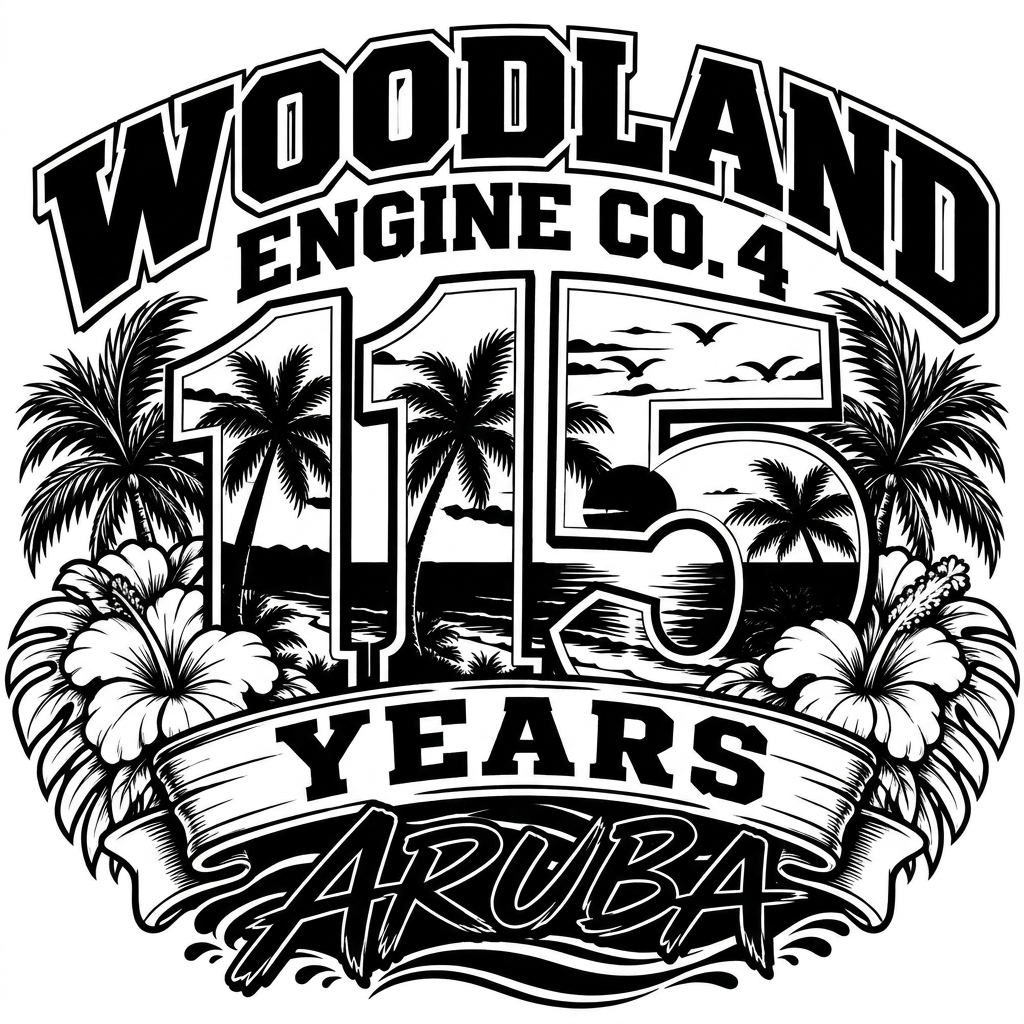
**TASK: EXACT IMAGE CONVERSION — NOT A REDESIGN** I am uploading my original full-color Woodland Engine Co. 4 Aruba logo. Your task is to convert this EXACT image into a clean, high-contrast, pure black-and-white version suitable for laser engraving. **CRITICAL: DO NOT REDESIGN, RECREATE, REINTERPRET, OR CHANGE THE COMPOSITION OF THIS IMAGE.** This is a color conversion task, NOT a logo design task. ### ABSOLUTE REQUIREMENTS 1. **PRESERVE THE ORIGINAL ARTWORK EXACTLY.** - Keep every letter, number, shape, object, and decorative element in its original position. - Preserve the exact proportions, spacing, alignment, and overall composition. - Do not redraw or alter the typography. - Do not add or remove any objects. - Do not simplify or reinterpret the logo. 2. **THE NUMBER 115 MUST REMAIN EXACTLY AS SHOWN.** - The number 5 must retain its original complete, continuous shape. - Preserve the distinctive curve, bottom loop, and all outlines of the 5. - Do not allow any scenery or background lines to break, obscure, or distort the number. - The entire 115 must match the original colored image precisely. 3. **PRESERVE THE TROPICAL SCENERY INSIDE THE NUMBERS.** - Keep the palm trees, sunset, ocean, birds, and island scenery in their original positions. - The ocean and scenery must remain clipped to the original number shapes. - Do not extend the water or horizon into the white background between the numbers or outside their outlines. - Do not add new palm trees, birds, clouds, or other elements. 4. **PRESERVE ALL TEXT EXACTLY.** - WOODLAND - ENGINE CO. 4 - 115 - YEARS - ARUBA All lettering must retain its exact original font style, placement, shape, and size. 5. **CONVERT COLORS TO BLACK AND WHITE ONLY.** - Use pure black (#000000) and pure white (#FFFFFF). - No gray, grayscale shading, gradients, halftones, or color. - Translate colored areas into clean black shapes and white negative space. - Maintain clear separation between overlapping elements. - Preserve the original design's details wherever possible. 6. **LASER ENGRAVING REQUIREMENTS.** - The artwork will be engraved approximately 3 inches wide on leatherette luggage tags using a 20W Creality Falcon2 Pro laser. - Ensure that important lines and details remain visible at this size. - Avoid tiny disconnected black dots, extremely thin lines, and excessive detail that may burn together. - Preserve the original composition rather than creating a new simplified design. ### MOST IMPORTANT INSTRUCTION **Treat the uploaded colored image as a locked master template. Change ONLY the colors to pure black and white.** The result must look like someone took the original artwork and professionally converted it for single-color laser engraving, NOT like an AI generated a new version inspired by it. If an exact conversion cannot be achieved, do not substitute a redesigned image. ### OUTPUT Produce a high-resolution, pure black-and-white image on a solid white background, maintaining the original image's exact dimensions and aspect ratio. If supported, also provide an SVG with clean vector paths suitable for laser engraving.

@Erik Rutha
Prompt
**TASK: EXACT IMAGE CONVERSION — NOT A REDESIGN** I am uploading my original full-color Woodland Engine Co. 4 Aruba logo. Your task is to convert this EXACT image into a clean, high-contrast, pure black-and-white version suitable for laser engraving. **CRITICAL: DO NOT REDESIGN, RECREATE, REINTERPRET, OR CHANGE THE COMPOSITION OF THIS IMAGE.** This is a color conversion task, NOT a logo design task. ### ABSOLUTE REQUIREMENTS 1. **PRESERVE THE ORIGINAL ARTWORK EXACTLY.** - Keep every letter, number, shape, object, and decorative element in its original position. - Preserve the exact proportions, spacing, alignment, and overall composition. - Do not redraw or alter the typography. - Do not add or remove any objects. - Do not simplify or reinterpret the logo. 2. **THE NUMBER 115 MUST REMAIN EXACTLY AS SHOWN.** - The number 5 must retain its original complete, continuous shape. - Preserve the distinctive curve, bottom loop, and all outlines of the 5. - Do not allow any scenery or background lines to break, obscure, or distort the number. - The entire 115 must match the original colored image precisely. 3. **PRESERVE THE TROPICAL SCENERY INSIDE THE NUMBERS.** - Keep the palm trees, sunset, ocean, birds, and island scenery in their original positions. - The ocean and scenery must remain clipped to the original number shapes. - Do not extend the water or horizon into the white background between the numbers or outside their outlines. - Do not add new palm trees, birds, clouds, or other elements. 4. **PRESERVE ALL TEXT EXACTLY.** - WOODLAND - ENGINE CO. 4 - 115 - YEARS - ARUBA All lettering must retain its exact original font style, placement, shape, and size. 5. **CONVERT COLORS TO BLACK AND WHITE ONLY.** - Use pure black (#000000) and pure white (#FFFFFF). - No gray, grayscale shading, gradients, halftones, or color. - Translate colored areas into clean black shapes and white negative space. - Maintain clear separation between overlapping elements. - Preserve the original design's details wherever possible. 6. **LASER ENGRAVING REQUIREMENTS.** - The artwork will be engraved approximately 3 inches wide on leatherette luggage tags using a 20W Creality Falcon2 Pro laser. - Ensure that important lines and details remain visible at this size. - Avoid tiny disconnected black dots, extremely thin lines, and excessive detail that may burn together. - Preserve the original composition rather than creating a new simplified design. ### MOST IMPORTANT INSTRUCTION **Treat the uploaded colored image as a locked master template. Change ONLY the colors to pure black and white.** The result must look like someone took the original artwork and professionally converted it for single-color laser engraving, NOT like an AI generated a new version inspired by it. If an exact conversion cannot be achieved, do not substitute a redesigned image. ### OUTPUT Produce a high-resolution, pure black-and-white image on a solid white background, maintaining the original image's exact dimensions and aspect ratio. If supported, also provide an SVG with clean vector paths suitable for laser engraving.
Modelo
NANO-BANANA-PRO
Tipo
Imagen
Me gusta
0
Relación de aspecto
1/1